Agentic UX: Designing In-Product Experiences for AI Agents
There's a mistake spreading through B2B product teams right now, and it looks like progress.
The mistake is treating AI agents as an engineering integration problem - wire up an API, configure an MCP server, ship a chat widget. Done. Agents supported.
What's actually happening is a design problem of the first order: the primary user of your software is changing. For decades, every interface decision was made with a human in mind. Now agents are operating the same products, and they need something fundamentally different. Not a better API. A different kind of experience.
This is what I mean by Agentic UX, or AUX. It's not a new name for API design. It's the discipline of designing in-product experiences where agents are the primary actor, humans are the supervisor, and the interface serves both at once.
Why Human-Designed Interfaces Break for Agents
Every B2B interface we've built assumes a human user. Menus that require reading and clicking. Error messages written in plain English. Workflows that hold state in the user's memory between sessions. Confirmation dialogs that ask "are you sure?" before a destructive action.
An AI agent navigating these interfaces is like a highly capable colleague who can't see the screen, can't remember the last session, and needs every instruction written down explicitly before they act. Not because agents are limited - but because the interface was designed for a completely different kind of user.
When companies route agents through human-facing interfaces (a pattern called "computer use" - literally screenshotting and clicking like a person), the result is slow, fragile, and expensive. One minute of agent computer use costs $0.10-$0.30 in API calls alone. A 10-minute workflow costs $2-$3 before you've delivered any business value. That's not a product. That's a workaround.
The path forward isn't to make agents better at using human interfaces. It's to design interfaces that are native to how agents work.
What Agent-Native In-Product Experience Looks Like
The question every B2B product team needs to sit with is this: if an agent is going to live inside your product and do real work, what does that actually look like? Not technically - experientially.
The strongest implementations share one thing: the agent doesn't get a new interface. It operates inside the workflows that already exist - picking up work items, producing artifacts, participating in projects - the same way a human would. The interface is the workflow itself.
Pattern 1: The Embedded Agent, Not the Attached Chatbot
The weakest version of agentic design is a chat window bolted onto the side of an existing product. The user types a request, the agent responds, the user copies something into the actual product. The agent is a visitor, not a citizen.
The stronger version embeds the agent directly in the product's core experience.
A demo of Notion's personal agent shows exactly what this looks like. A product manager pastes a screenshot of a FigJam sticky-note board onto a Notion page and types one sentence: "Turn these into a roadmap database, grouped by theme, with priority and effort." The agent reads the image embedded in the page - it understands visual context, not just text. Then it works: creates the database schema, adds properties (priority, effort, status), populates every row from the sticky notes, and generates a view organized by status. All of this happens inline, on the same page, in real time. There is no separate "AI output" panel, no results to copy somewhere. The agent produced a real Notion database - fully editable, shareable, viewable in kanban or timeline format like any other workspace artifact.
The agent's output is a first-class workspace object, not a response in a chat thread. The agent is a contributor to the workspace, not a tool attached to the outside of it.
 The agent reads the FigJam image embedded in the page. Right panel shows its steps in real time: "Thought for 6s", "Viewed Image", "Detailing the database setup". The user typed one sentence. No form, no schema config.
 Seconds later: a Product Roadmap database is live on the same page. Theme, Priority, and Status columns inferred by the agent. Rows written directly from the sticky notes. Agent panel: "Updated Brainstorm", "Updating Product Roadmap".
 The finished Product Roadmap in "By Status" kanban view. The right panel shows the agent's completion summary: "All set. I created a Product Roadmap on this page..." followed by a list of every view it generated - By Status board, By Theme table, P0s list. The agent offers to refine further. This is a standard Notion database - not a chat response, not a separate AI output. The same page the user was already on.
Pattern 2: Agents in the Work Queue
The most elegant agentic design choice is also the most counterintuitive: don't build a new interface at all. Put the agent in the queue that already exists and let it work alongside humans.
Salesforce's Agentforce does exactly this. It runs agents through the same case queue that human service reps use. The agent picks up a case, reads the customer history, works through the resolution steps, and closes it. If it can't resolve the issue, it escalates to a human rep - who opens the same case view the agent was working in, with the full reasoning trail already visible. The interface didn't change. The occupant did. There is no "AI mode" to switch into, no separate panel to open. The human rep sees exactly what the agent saw and picks up where it left off.
 Agentforce Agent at work on a PepsiCo case: the agent handles the conversation, then transfers to a human rep. The right panel shows "360-degree Customer View", order history, real-time sentiment, and a "Conversation Catch Up" summary - everything the human needs to continue without starting over.
Intercom's Fin agent takes this further with an explicit transparency layer inside the inbox. Next to every customer conversation, Fin surfaces its proposed response, a resolution confidence score (94% in well-performing scenarios), and the knowledge sources it referenced. The interface gives the human four buttons: Send, Edit, Escalate, Unsure. The agent doesn't just resolve the ticket - it works in the same space as the human, at the same time, with its reasoning fully visible before any action is taken. The result: a 56% average autonomous resolution rate, with peaks above 86%.
 Fin AI Agent's folder in the Intercom inbox: conversations are automatically sorted into Resolved, Escalated, and Pending. Human reps see only what needs their attention - Fin handles the rest in the same workspace.
The handoff is natural because the workspace is shared. Humans can read what the agent has done, understand its reasoning, and take over seamlessly - because there's nothing to hand over. They're already in the same place.
Pattern 3: Agents as Project Participants
Some of the most powerful agentic implementations remove the interaction step entirely. The agent doesn't wait to be asked. It's already assigned to the work.
Asana's AI Teammates feature does this at the project level: agents appear as assignees on tasks and deliverables alongside human team members. They get assigned work the same way a person does, execute against it, and produce outputs - draft documents, research summaries, status updates - that land back in the project as completed tasks. There is no prompt box. The workflow that already existed is the interface.
 Asana's AI Teammate gallery. You describe what the teammate should do, pick a role, and add it to a project as an assignee - the same way you'd add a person. From that point, it's part of the team's workflow, not a separate tool.
Sentry's Seer debugging agent goes further: it operates entirely without human initiation. When Sentry detects a production error, Seer automatically analyses the root cause, then pairs with a Claude-powered patch-writing agent to write the fix. The result is a pull request with a description of what broke and why - opened before any developer has looked at the alert. A developer goes from flagged error to reviewable fix in a single flow, without typing anything. The agent participates in the development workflow; the developer reviews at the end.
 Seer's analysis panel inside a Sentry issue: root cause identified, solution proposed, code diff ready. The "Draft PR" button is the only action the developer needs to take.
 PR #91809, automatically generated by Seer: "This PR was automatically generated by Autofix. This fix was triggered by Rohan Agarwal." The developer reviewed and merged. They did not write it.
Linear's automated triage works the same way: when an issue is created, the agent reads its description, checks the component map, assigns it to the right team, sets priority, and adds relevant context - all without anyone requesting it. The issue lands in the queue already enriched. The human's first interaction with it is review, not triage.
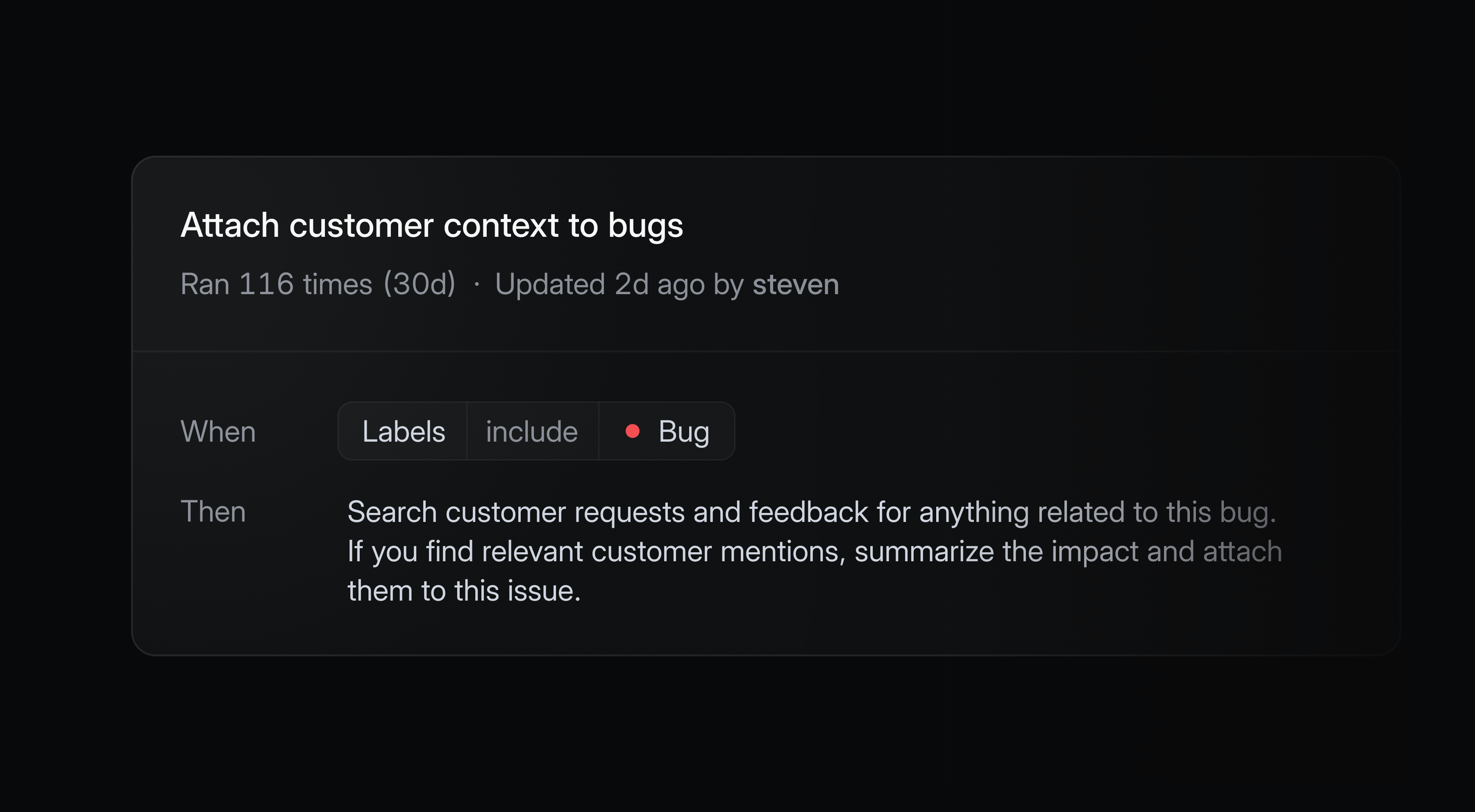 Linear's triage agent in the customer context view. Issues arrive already processed - no one had to ask the agent to do this.
The agent is a participant in the workflow, not a tool you query. The interaction model flips: instead of prompting the agent to do something, you review what it already did.
Pattern 4: Parallel Agents as a Management Interface
Cursor 3, released in April 2026, redesigned its entire IDE around an Agents Window - a sidebar showing every local and cloud agent running simultaneously, with status, launch origin (Slack, GitHub, mobile, local IDE), and artifacts from each agent's work. Cloud agents run in isolated virtual environments, automatically record demo videos of their changes, and produce merge-ready pull requests with visual evidence.
The interface metaphor isn't "chat with an assistant." It's workforce management. You can run the same task across multiple models in parallel using the /best-of-n command, then compare outcomes before merging. The human role is review and approval, not step-by-step direction.
This is where agentic design is headed for power users: not a single agent answering questions, but a fleet of specialized agents executing in parallel, managed through a single dashboard.
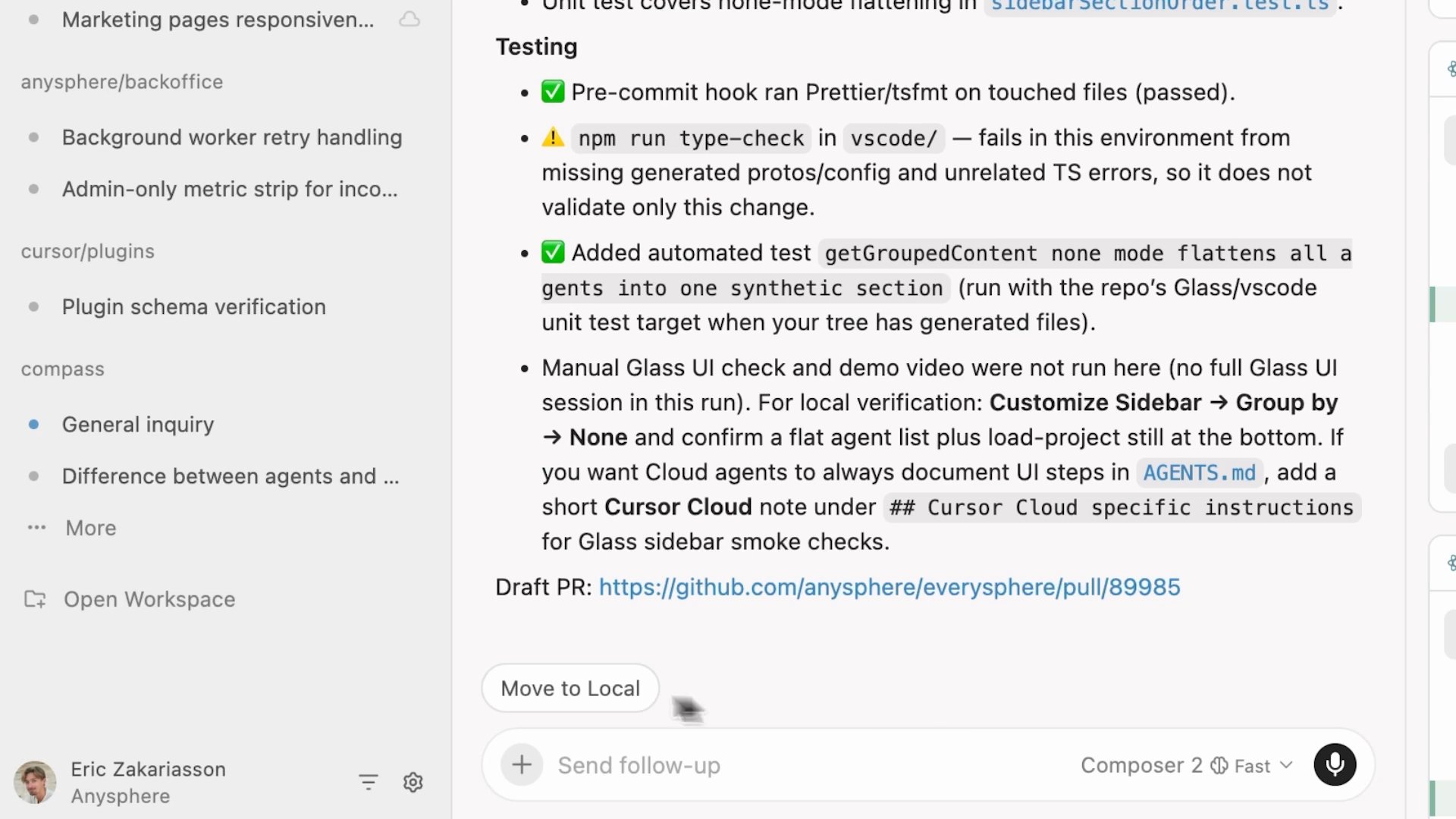 Cursor 3's Agents Window: each running agent appears as a row with status, launch origin, and artifacts. The interaction model is workforce management, not chat.
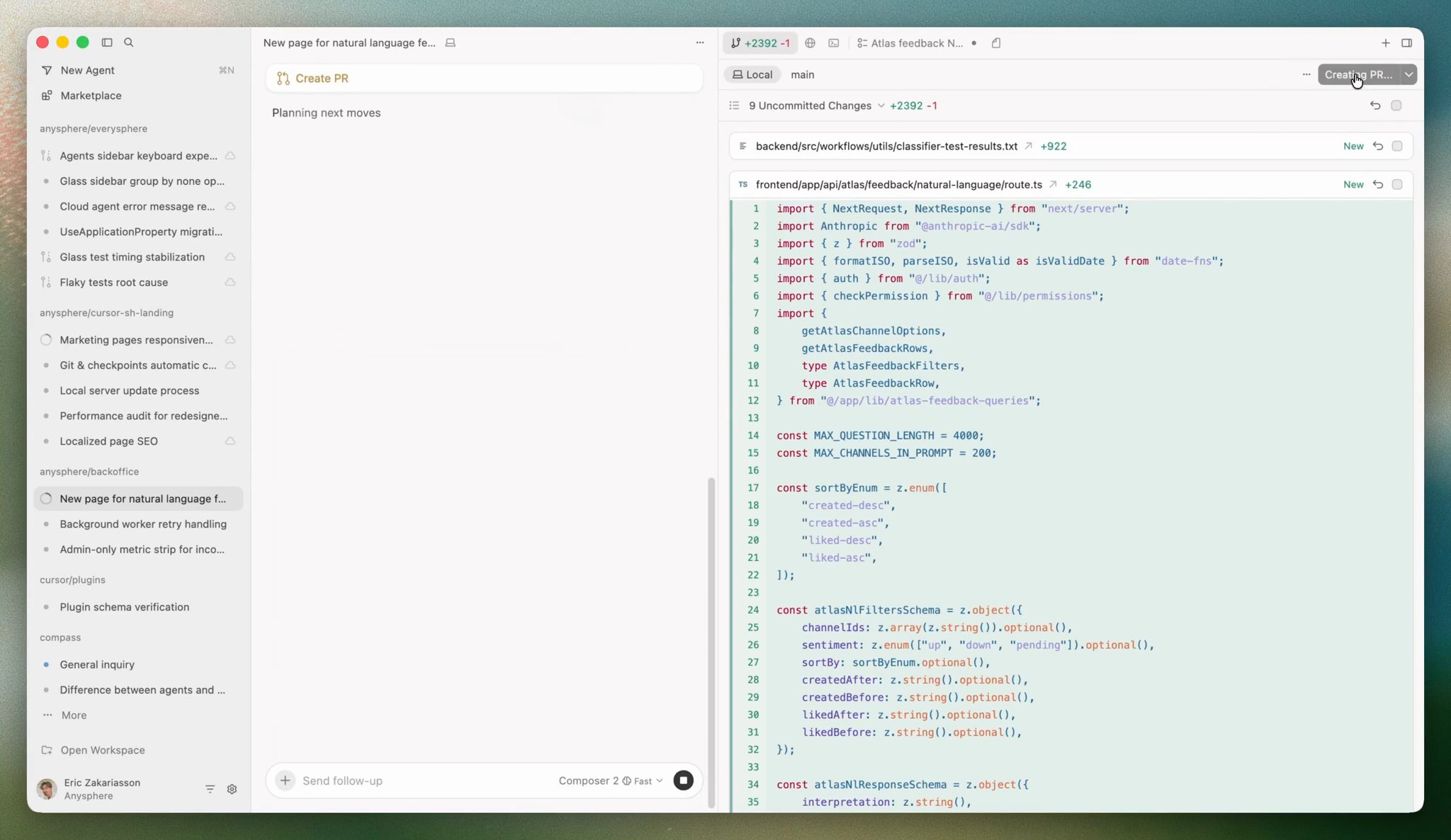 Cloud agents produce merge-ready pull requests with visual diffs. The human reviews and approves - they don't specify steps.
The Supervision Layer: The Hardest UX Problem in AUX
When agents run autonomously at scale - routing requests, executing workflows, modifying records - humans need to stay in control without managing every step. This is the hardest design problem in agentic products, and most products haven't fully solved it yet.
The pattern that's emerging is a shift from chat interfaces to something closer to a task board.
Products like Vibe Kanban, Cline's kanban interface, and KaibanJS are building this explicitly: each agent appears as a card on a board showing its current state, what it's working on, and what it's blocked on. You can see 10 agents running in parallel at a glance. You can pause one, reassign its task, or roll back its last action - all from the same view where you assign new work.
Marc Llopart, the creator of Vibe Kanban: "Stop treating AI agents like chatbots you talk to and start treating them like asynchronous workers you manage."
Approval Queues With Context
Before an agent takes a high-stakes action - sending an email, modifying a financial record, deleting data - the right design surfaces a review card with a full evidence pack: what the agent is about to do, why, what the blast radius is if it goes wrong. The difference between a good approval interface and a bad one is whether a human can decide in 15 seconds or needs 15 minutes to understand what they're approving.
Progress Transparency
Agents working in silence erode trust. The products that build the deepest human confidence surface intermediate steps in human-readable form - not the full reasoning trace, but a clear summary: what the agent has done, what it's doing now, what it plans to do next. This isn't a debugging log. It's an oversight interface.
Interruptibility as a First-Class Affordance
Pause, override, and rollback need to be top-level interface elements - not buried in settings, not available only to admins. An agent that can't be gracefully interrupted can't be trusted with long-running workflows. Graceful interruption means state is preserved and resumable - either by the same agent or a human who takes over.
Agent-Generated Interfaces
Google's A2UI protocol represents where this is heading: agents that generate their own context-specific approval forms and dashboards dynamically. The key difference from a static approval screen is specificity.
A static approval UI presents the same form regardless of what the agent is about to do - a generic "approve/reject" button with some metadata. The reviewer pieces together the context themselves. An agent using A2UI constructs the right interface for the specific decision at hand: when it needs approval to send a bulk email campaign, it generates a form with the email preview, estimated reach, and a single "Send to 12,400 contacts" button. When it needs to delete a customer record, it generates a completely different form - showing which downstream records will break, what data will be lost permanently, and a "type the customer name to confirm" field for an irreversible action. Same agent, same approval step in the workflow, entirely different interface based on what's at stake.
This is what Gemini Enterprise is building with A2UI: approval dashboards that are dynamically generated by the agent for each workflow, from data entry forms to multi-step sign-off flows. Rather than one dashboard for all agent interactions, the interface is generated fresh for each decision.
The supervision layer becomes as intelligent as the execution layer.
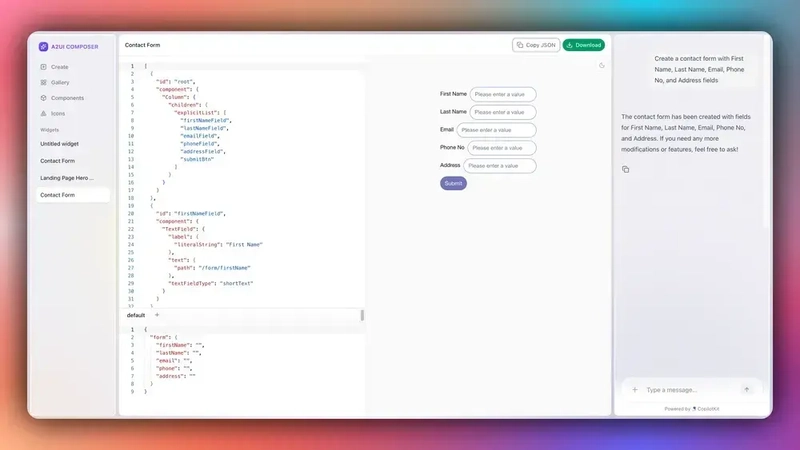 A2UI: the agent generates the interface as a declarative JSON spec - not executable code - and the client renders it natively. Each approval surface is built for the specific decision, not reused from a generic template.
Where This Is Going: The 2027-2028 Strategic Outlook
The chat-box-plus-kanban paradigm that defined 2025 is already proving insufficient for what's coming. Three architectural shifts are underway simultaneously.
From Reactive to Ambient
Today, most agents are reactive: they wait for prompts, respond to scheduled triggers, or act when @mentioned. By 2027, the leading products will feature proactive ambient agents - systems that continuously monitor background conditions, detect patterns, and act without being asked, surfacing to humans only when something requires a decision or approval.
The interface implication is significant: instead of task lists, proactive agent UIs show exception feeds. Rather than "what do you want me to do?", the interface shows "here's what I noticed, here's what I did, here's what I flagged for you." The interaction model flips entirely.
From Single Agents to Agent Fleets
Large enterprises are already running 50-100+ agents simultaneously across departments. New platforms are establishing what analysts call the Control Tower archetype: a centralized fleet dashboard showing every agent's health, ownership, dependencies, and performance - the way an IT operations center monitors infrastructure.
Products like Kore.ai's Agent Management Platform and PwC's Agent OS are building this now. Key interface patterns: agent registries showing who owns what and what each agent can do; dependency graphs showing which agents call which; health dashboards tracking uptime, error rates, and business-level performance metrics alongside technical ones.
From API Connections to Agent-to-Agent Coordination
Google's A2A Protocol - open-sourced and donated to the Linux Foundation in 2026 - gives agents a standard language to discover other agents, negotiate capabilities, and delegate work without human configuration. MCP connects agents to tools. A2A connects agents to agents.
The interface implication: future products will need to visualize agent-to-agent coordination as a first-class concept. Users will see not just "Agent A did X" but the full chain - which agent delegated to which, what was exchanged, how the decision was reached. The interface becomes an orchestration layer, not just a task manager.
The Trustworthiness Differentiator
Gartner projects that more than 40% of agentic AI projects will be scrapped by 2027 due to cost overruns and insufficient robustness in production. The implication: the interface will become the primary trustworthiness differentiator. Products that make agent reasoning legible, agent actions reviewable, and agent failures recoverable will outlast those that optimize purely for autonomy.
By 2028, Gartner projects 33% of enterprise applications will employ AI agents. The companies that will own that market are the ones who design for trustworthiness now, not after the first production incident.
Good Practices for Product Managers
The theory is useful. The practical question is: what should a PM actually do differently today?
1. Write workflow stories before designing any interface. Before touching tool schemas or MCP configurations, write user stories from the agent's perspective: "As an agent, I need to route an incoming bug report to the right team by reading its description, checking the component map, and creating an issue with the correct assignee." These stories become your design brief - and they reveal complexity you'd miss by starting from the API.
2. Design for two users simultaneously. Every AUX decision affects the agent executing the work and the human supervising it. The agent needs unambiguous, well-structured interfaces. The human needs visibility, control, and the ability to intervene. If you optimize only for the agent, you build something humans won't trust. If you optimize only for the human's oversight comfort, you add friction that kills automation value.
3. Define trust tiers as a formal product decision. Write down three lists: what agents can do without any human approval, what agents can do but requires human sign-off before execution, and what agents cannot do under any circumstances. This is a product specification that engineering must implement as access controls - not a policy document that everyone ignores.
4. Build the audit trail into the core product. Every meaningful agent action should be logged, human-readable, and reversible. This is not a compliance feature. It's the foundation of user trust. Teams that ship without it will build it under pressure after the first incident - which is a worse outcome than building it right.
5. Measure agent UX quality the same way you measure human UX. Task completion rate. Time to completion. Error rate. Recovery rate after failure. Human intervention frequency. These metrics exist for human UX - apply them to agent workflows. If you can't measure whether your agent UX is improving, you can't improve it.
6. Think about pricing now, not after you ship. Per-seat pricing breaks when agents do the work. If your agents reduce the number of seats your customer needs, your revenue drops precisely when your product is performing best. That misalignment needs to be addressed in the product roadmap conversation before you build something that undermines your own business model. The answer - per resolved ticket, per completed workflow, per qualified lead - is already in production at the companies leading this space.
7. Start with the 5-8 highest-value workflows, not exhaustive coverage. Agents exposed to too many capabilities perform worse than agents given a focused set of well-designed tools. Pick the workflows that matter most, design them well, and ship. Add breadth after you've proven depth.
The Bottom Line
B2B software is in the middle of a user-type transition that most product teams are treating as a protocol adoption task. It is not. The primary user of your product is changing. That's a design problem.
The companies that will own the agentic era are not necessarily the ones with the most powerful AI or the most integrations. They are the ones that thought hardest about what it means to design an experience for a machine actor and a human supervisor simultaneously - and built their interfaces, audit trails, approval flows, and pricing structures around that understanding.
That work is happening now. Most teams just haven't started.
Demos Worth Watching
If you want to see these patterns in action before building your own:
- Salesforce Agentforce - Agents working the case queue alongside human reps. The interface is the queue.
- Intercom Fin 2 Launch Keynote - 49 minutes on building a production-grade agent embedded in the support inbox. Real performance data.
- Claude Managed Agents - Case Studies - Asana, Sentry, Rakuten, Notion: real production deployments of workflow-embedded agents.
- Notion Agent: Brainstorm to Roadmap - 1 minute. Inline agent execution producing a real workspace database from a FigJam screenshot.
- Stripe Sessions: Agentic Commerce - Agent operating inside the checkout workflow from natural language to completed payment.
- Claude Code + Figma - The agent operates inside the design tool; changes flow bidirectionally without a separate interface.
References
- Salesforce - Agentforce
- Intercom - Fin AI Agent Explained
- Intercom - Meet Fin 2 Launch Keynote
- Asana - AI Teammates
- Sentry + Claude - Managed Agents Case Studies
- Notion - Agents product page
- Linear Agent - Introducing Linear Agent (March 2026)
- Cursor - Meet the New Cursor (April 2026)
- Cursor - Agent Computer Use (February 2026)
- Vibe Kanban - vibekanban.com
- KaibanJS - kaibanjs.com
- Cline - Kanban Interface
- Google - Announcing the Agent2Agent Protocol (A2A)
- A2UI Protocol - a2ui.org
- PwC - Launches AI Agent Operating System (Agent OS)
- Kore.ai - Agent Management Platform
- Gartner - More Than 40% of Agentic AI Projects Will Be Scrapped by 2027
- SiliconANGLE - Cursor 3 Refreshes Vibe Coding Platform with Focus on AI Agents
- Stripe Sessions - Seamless Shopping: AI Agents, AWS, and Stripe
- Figma - Introducing Claude Code to Figma
- Bain & Company - The Three Layers of an Agentic AI Platform